CASE STUDY
Optimising high-volume customer support workflows for scale and efficiency
ROLE
UX UI Designer & Developer
TIMELINE
10 months
DELIVERABLE
Web app
OUTCOME
6× enquiry throughput
01: Overview
WhatsApp Redesign
Reimagining messaging for employees and customers
This project was conducted at Citiq Prepaid, a prepaid utilities provider, as part of an initiative to improve high-volume customer support workflows through WhatsApp.
As WhatsApp became a primary support channel, internal teams faced increasing difficulty managing large volumes of conversations efficiently. The existing system lacked structure, visibility, and scalability, impacting both agent performance and customer experience.
This case study explores a redesign focused on improving information architecture, reducing cognitive load, and enabling faster and more effective support interactions.
"I need to find messages quickly without endless scrolling through chat history."
02: The Challenge
From Chaos to Structured Workflows
Initially, a complete redesign was the initital request, howvever, the main pain point was to reconsider the WhatsApp agent experience to support efficiency, clarity, and scalability within a constrained technical environment.
This required:
Understanding real agent workflows and pain points
Identifying systemic inefficiencies across team structures
Designing solutions that worked within API and infrastructure limitations
Introducing structure without disrupting familiar behaviours
The challenge was not just improving UI — but rethinking how conversations are managed at scale.
03: User Research
Uncovering User Needs and Friction
To understand how the system was performing in practice, I analysed internal feedback, observed agent workflows, and reviewed usage patterns across support teams.
What quickly became clear was that the experience wasn’t just inefficient — it was actively working against the way agents needed to operate.
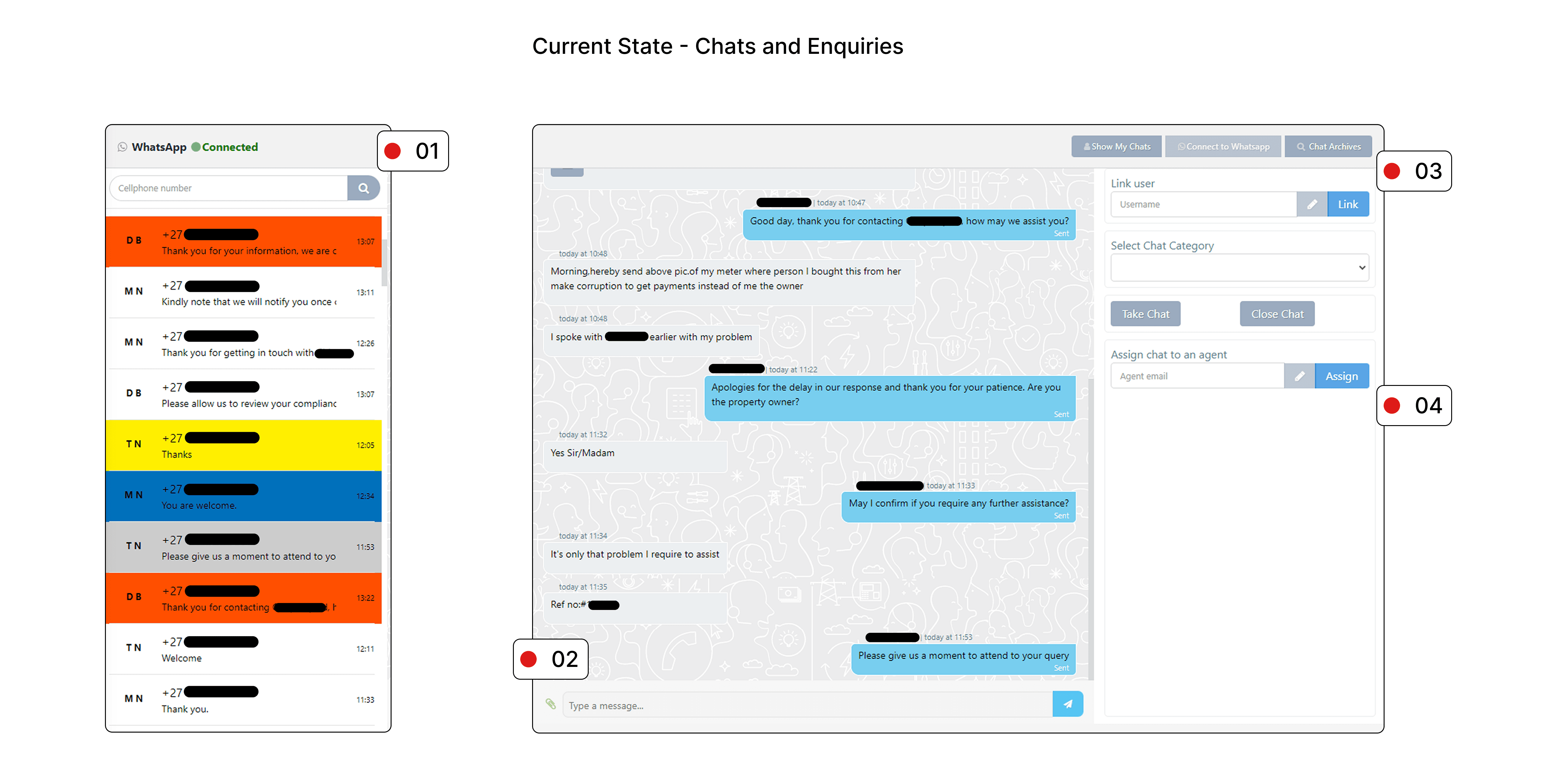

Key findings:
Average satisfaction: 2.6 / 5
Recurring issues: slow performance, unreliable message delivery, and a lack of automation
Most requested improvements:
CRM integration
Auto-assignment of chats
Pre-saved replies
Beyond the metrics, the underlying problem was a lack of structure and visibility. All incoming chats were pushed into a single, unstructured feed, making it difficult for agents to prioritise or track conversations effectively.
Over time, this led to a build-up of friction across the system:
52% of agents reported significant frustration with the existing tools
Limited access to archived conversations slowed down resolution and collaboration
A large portion of time was spent on repetitive, manual tasks
40% of incoming chats were recurring account-related queries
Technical issues, including dropped or delayed messages, disrupted already fragile workflows
As demand increased, these issues compounded — impacting both internal efficiency and the overall customer experience.
Agents consistently described feeling overwhelmed. They were not only trying to respond to customers, but also constantly managing and navigating the system itself.
“I spend more time managing chats than actually helping customers.”
As message volumes grew, this turned into a cycle of stress and fatigue. Important queries were easy to miss, repetitive tasks became draining, and the lack of visibility created a sense of losing control over their workload.
This emotional strain didn’t just affect agents — it directly impacted response times, consistency, and the quality of support being delivered.
04: UX Audit
Workflow Audit
A structured audit of the employee experience revealed several system-level breakdowns impacting efficiency and collaboration:
Unstructured Chat Feed
All incoming enquiries were surfaced in a single continuous stream, making it difficult for agents to prioritise or track conversations effectively.
Role-Based Access Limitations
Restricted access to archived chats created unnecessary dependencies, slowing down collaboration and resolution times.
Manual Task Overload
The absence of automation resulted in repetitive actions, increasing cognitive load and reducing overall efficiency.
Technical Instability
API limitations and dropped messages disrupted workflows and reduced trust in the system.
Fragmented Workflows
Agents operated in silos, leading to inefficient handoffs and limited visibility across the team.
05. Proposed Solution
Improving the Support Experience
To address these challenges, I focused on introducing more structure and scalability into the existing workflow, without making the experience feel complicated.
I started by rethinking how conversations are managed. The “My Chats” interface was redesigned to support multitasking, allowing agents to handle up to six chats at once. Conversations were organised using a first-in-first-out (FIFO) distribution model, along with clear, enquiry-based categories. This made it easier for agents to prioritise their workload and understand what required attention at any given moment.
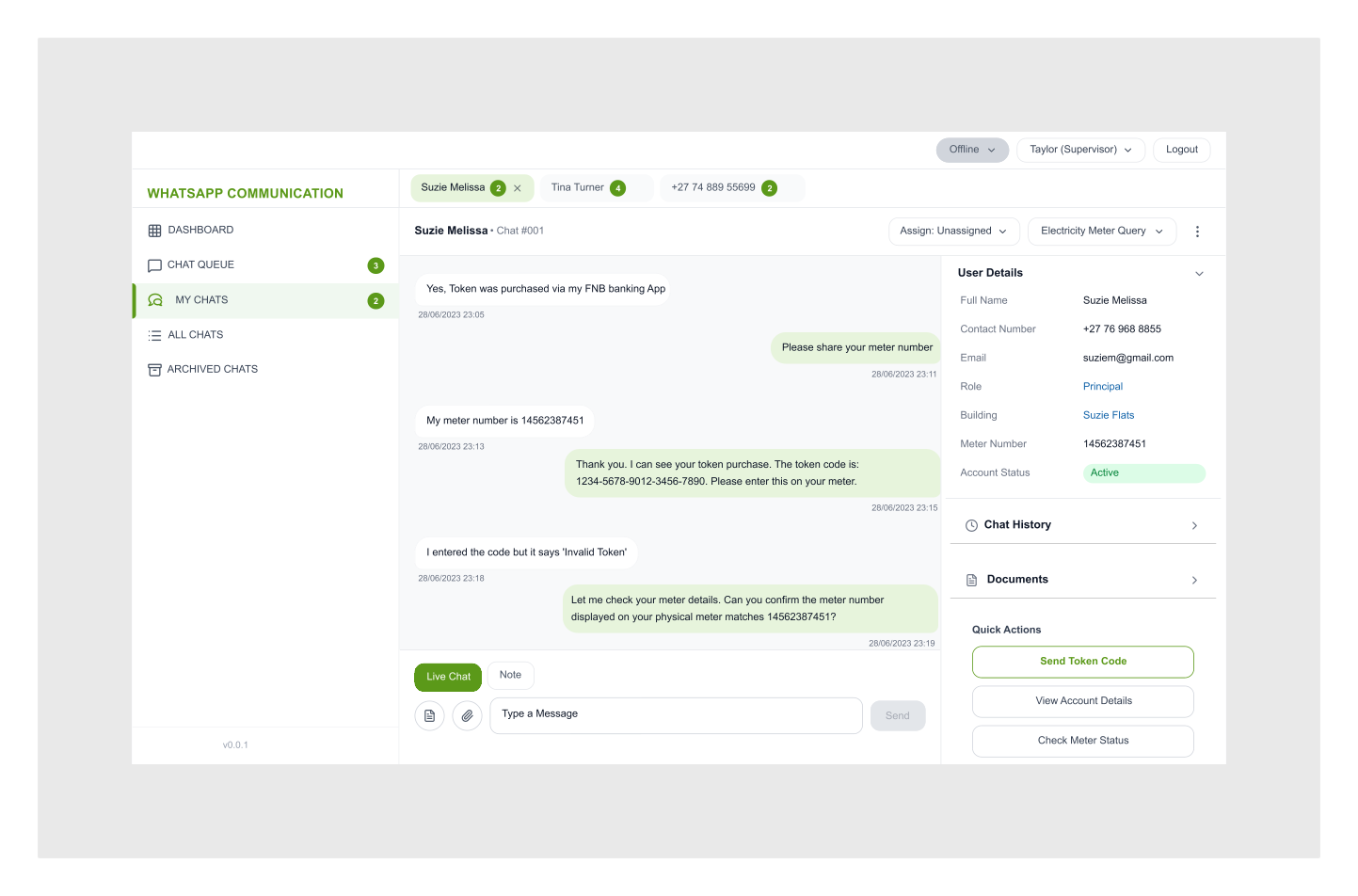
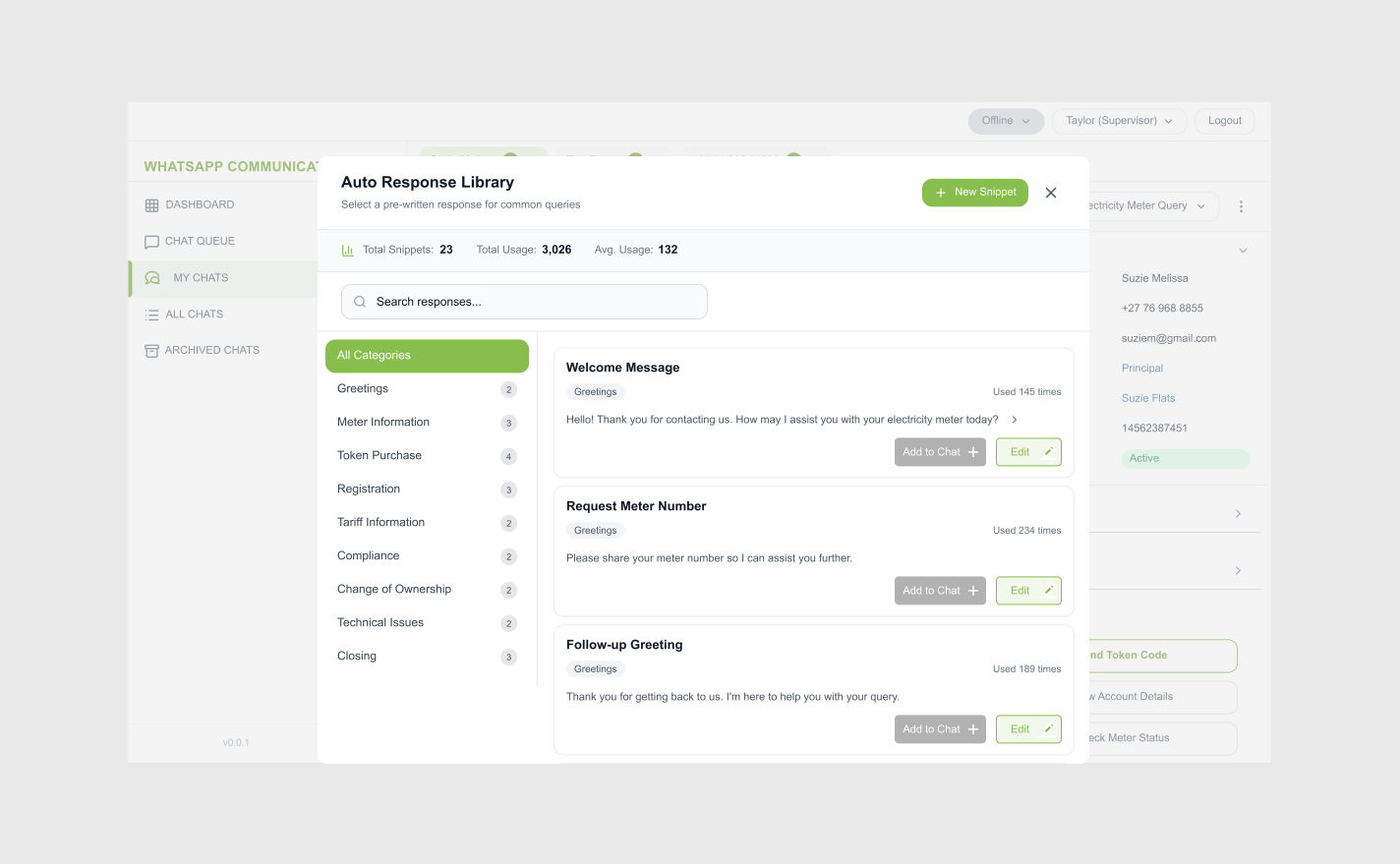
To reduce repetitive manual effort, I introduced a more automation-ready system. This included pre-saved replies for handling common queries and customer number matching to provide better context upfront. The system was also designed with future chatbot integration in mind, laying the foundation for greater efficiency and scalability.
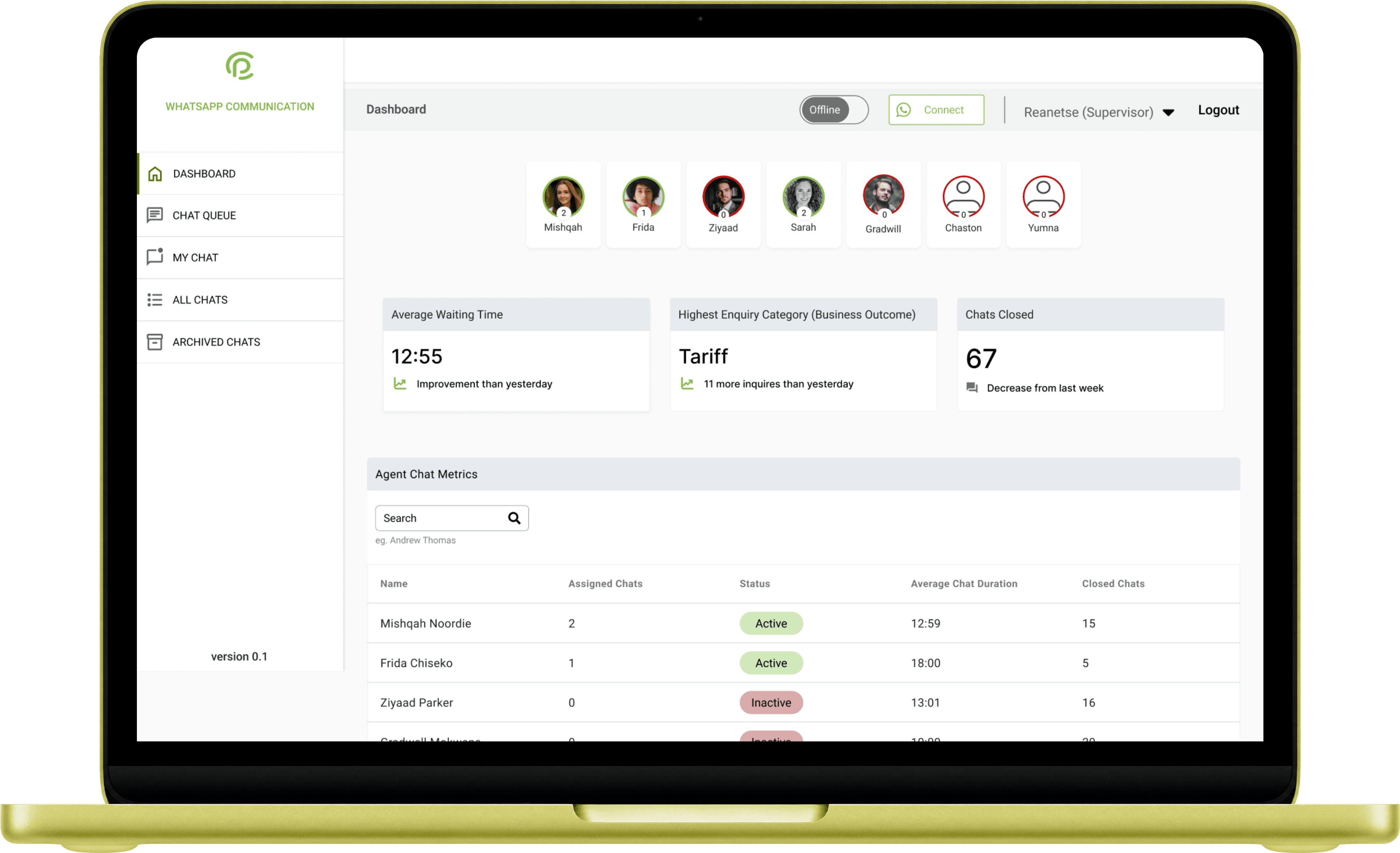
Improving team visibility was another key focus. A Kanban-style dashboard was introduced for supervisors, providing real-time insights into agent workload and conversation progress. This helped streamline coordination and made it easier to identify bottlenecks or support needs across the team.
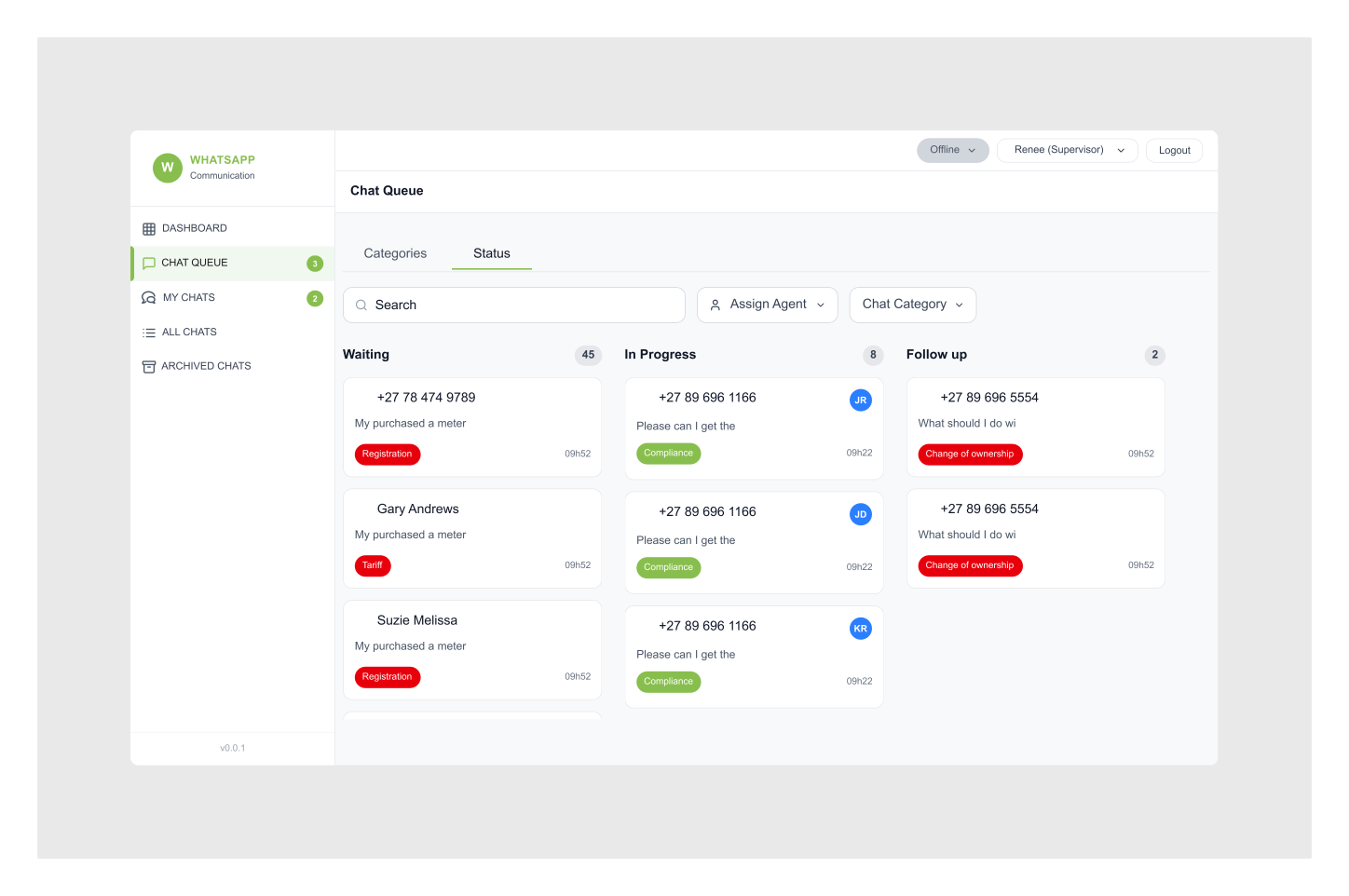
Finally, I addressed some of the immediate technical friction points through lightweight UI improvements. Reconnection prompts were added to handle dropped sessions, and system feedback toasters were introduced to give users clearer visibility into system status. These small changes helped improve trust and usability, even within existing technical constraints.
06: Conclusion
Outcomes, Impact & Key Learnings
The proposed solution addresses key inefficiencies in Citiq’s support workflows by introducing structure, improving visibility, and reducing manual effort.
Key Outcomes:
Improved agent efficiency and task clarity
Reduced cognitive load in high-volume environments
Enabled real-time monitoring for supervisors
Established a foundation for scalable automation
While implementation was ultimately deprioritised due to development timelines and broader business priorities, the solution provides a strong framework for future improvements in customer support operations.
NEXT CASE STUDY